
Filtering and Search
Use the dashboard toolbar to narrow down pull requests in the current tab. Search by title or PR ID, then combine filters such as repository and author.

The toolbar contains keyword search, repository, author, status, age, checks, and sorting controls. The table below explains each one.
Open full-size image (new tab)Filter by Author
Open Author and select one or more people. You can combine the author selection with other filters; it applies within All PRs, My PRs, or My Reviews, whichever tab is active.
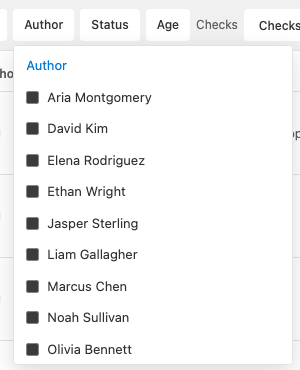
The author filter supports multiple selections.
Open full-size image (new tab)Filters
| Filter | Behavior |
|---|---|
| Keyword | Matches the pull request title and PR ID, such as #123 or 123. |
| Repository | Multi-select repository filter. |
| Author | Multi-select author filter. |
| Status | Multi-select filter for Active, At Risk, Stuck, and Draft. |
| Age | Multi-select filter with fixed bands: < 24h, 24–72h, and > 72h. |
| Checks | Single-select filter for Passed, Failed, Pending, and No Checks. |
| Sort | Single-select sorting mode. |
Sorting Options
- Last activity, newest first
- Last activity, oldest first
- Repository, A–Z
- Author, A–Z
How Filters Apply
- Filters can be combined.
- Filter state applies within the active tab: All PRs, My PRs, or My Reviews.
- Search currently targets pull request title and ID, not description or body text.