
Team Insights
PR Pulse provides lightweight team-level visibility directly in the dashboard.

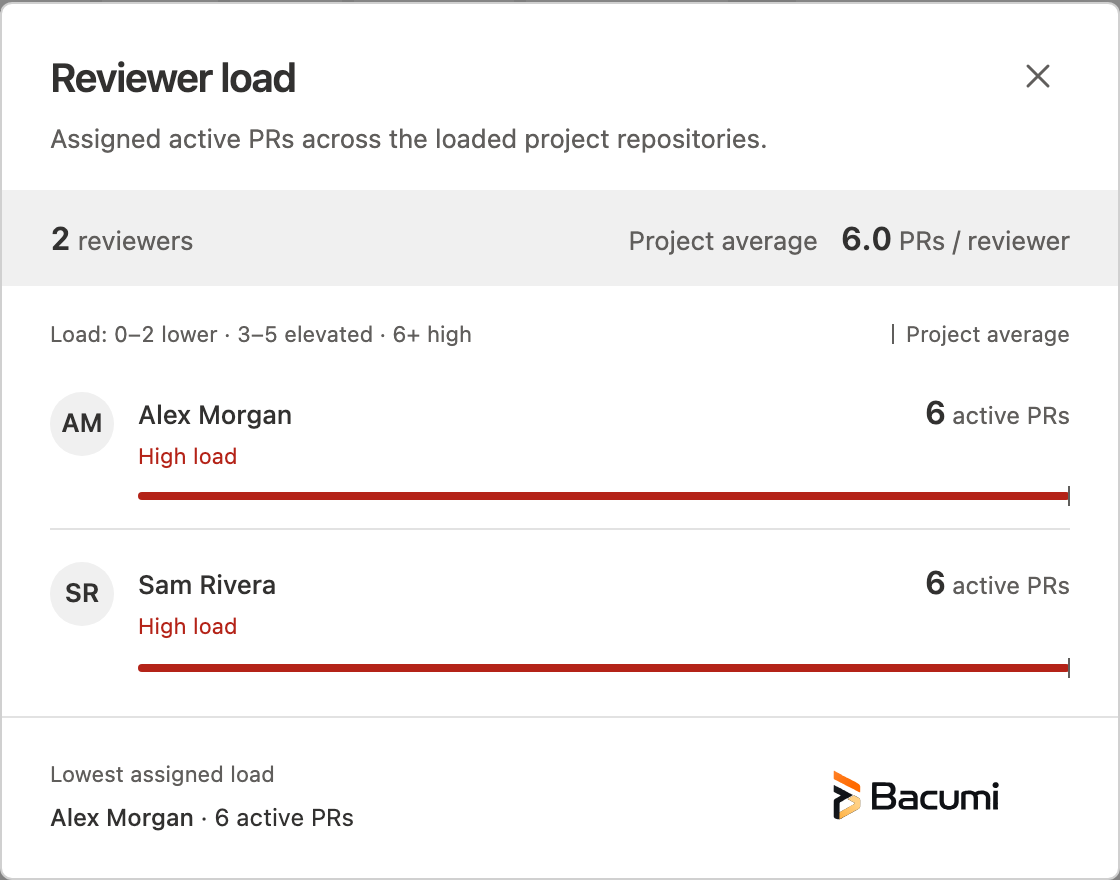
Reviewer Load
In the All PRs tab, PR Pulse counts assigned active pull requests for reviewers across the project repositories loaded by the extension.
- Avatar chips display up to four reviewers with a count badge.
- Lower load: zero to two active assignments.
- Elevated load: three to five active assignments.
- High load: six or more active assignments.
- The ellipsis button, or +N when more than four reviewers are shown, opens the Reviewer load dialog.
- The dialog lists reviewers included in the loaded project data, shows the project average, and labels the reviewer with the lowest assigned load. Its bars scale to the highest count in that list.
These counts describe active PR assignments only. They do not measure a reviewer's availability, skills, or other work; use project context when deciding how to assign reviews.
PR Health Chips
PR Pulse summarizes active pull request recency into three fixed buckets:
- Fresh: less than 24 hours since meaningful activity
- Aging: 24 to 72 hours since meaningful activity
- Critical: more than 72 hours since meaningful activity
This gives engineering leads a current-state signal of review flow health without an external report.